SETUP REFERENCE · CHOOSE YOUR ROLE
Your first campaign, together
Set up inside the platform: Open Account setup to complete the real forms, save each step and resume later. This page is a reference; you do not need to follow it alongside the setup flow.
A visual start-to-finish guide to Adludo. Choose your role, prepare your part of the campaign, and know what to look for before moving on.
Jump to a step
I’m a game developer
Offer a game surface, decide what brands may change, review proposed artwork, and connect your game’s measurement integration.
Start the developer walkthrough →
Have ready: your game details, a real scene screenshot, the surface’s artwork dimensions and permissions, and someone who can work on the game integration.
I’m an advertiser
Bring a brand kit, choose a suitable game placement, review artwork with its developer, and follow recorded exposure.
Start the advertiser walkthrough →
Have ready: your original logo, brand colors and guidelines, a short campaign message, and access to an advertiser workspace.
How the two sides meet
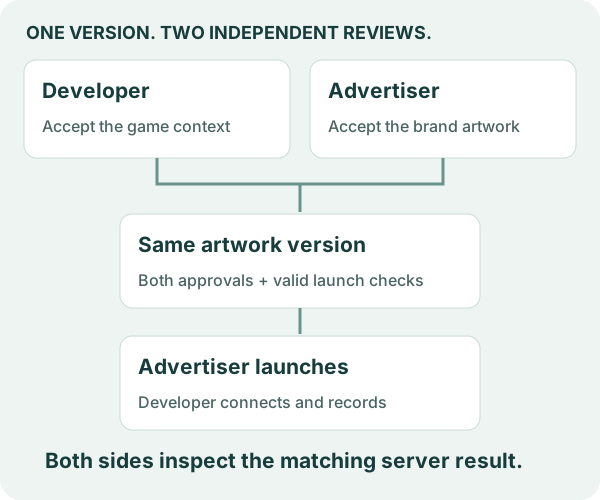
Each side approves for itself. Publishing a placement makes it discoverable; launching makes an eligible campaign available for assignment. A game integration and an opted-in recording are still needed to produce a native report.
Before you start
Create your own account and choose your developer or advertiser workspace. Follow your own role; each company makes its own approval decisions.
Game integrations need validation, and billing and payouts are disabled. These guides describe the workflow for your own brand or game. Screenshots show fictional local examples; their names and settings are not required inputs.
Create your own account
Use Create account, verify your email, and choose your developer or advertiser workspace. Your account is independent of other companies. Sign in to return to it. Account settings and sign-out are available from your profile button. Account access and privacy explains recovery and retained workspace records.